Work / Desktop apps / System
Ferry
Keep a folder backed up or in sync with an external drive, a second disk or a network share, and see exactly what it will do first.
What it does
Keep a folder backed up or in sync with an external drive, a second disk or a network share, and see exactly what it will do first.
Ferry keeps a folder backed up or in sync. Pair a folder with another folder, on an external drive, a second disk or a network share, and Ferry keeps the copy up to date: when the drive is plugged in, on a schedule, as files change, or when you say. It keeps older versions of changed and deleted files for a while, and it always shows you exactly what it is going to do before it does it.
Three kinds of job
- Backup: one way. New and changed files are copied. Files you delete from the source stay in the backup, or move to the versions area after a number of days if you prefer.
- Mirror: one way, the destination made identical to the source. Deletions carry across, but through the versions area, never straight to nothing.
- Two-way sync: changes on either side go to the other. Ferry remembers what it last synced, so it can tell "deleted here" from "new there". If the same file changed on both sides, both copies are kept and listed for you to settle; Ferry never picks a winner by itself.
- The destination is plain files and folders. They open in Explorer with no special software, with or without Ferry.
See it before it happens
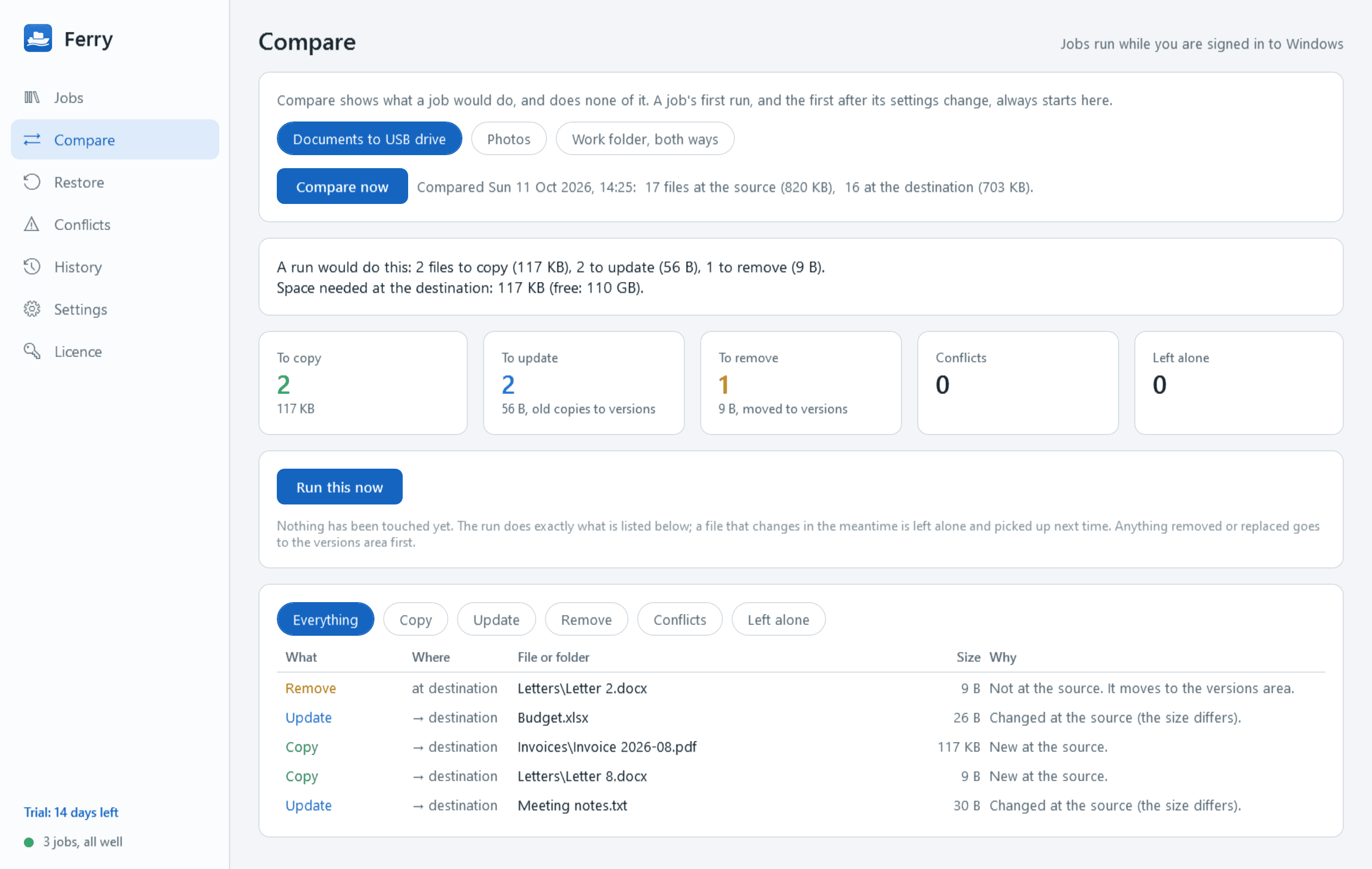
- Compare lists exactly what would be copied, updated, removed or flagged as a conflict, with sizes, before anything is touched.
- A job's first run, and the first after its settings change, always goes through Compare. The run then does what was listed and nothing else.
- "Changed" means a different size or modified time, allowing for the 2-second times and the daylight-saving hour of FAT and exFAT drives, or, if you choose, a full comparison of contents.
A safety net of versions
- Before a file in the backup is replaced or removed, the old copy is moved to a dated versions folder beside the backup.
- Keep versions for a number of days and/or a number per file (30 days unless you change it), and see how much space they use.
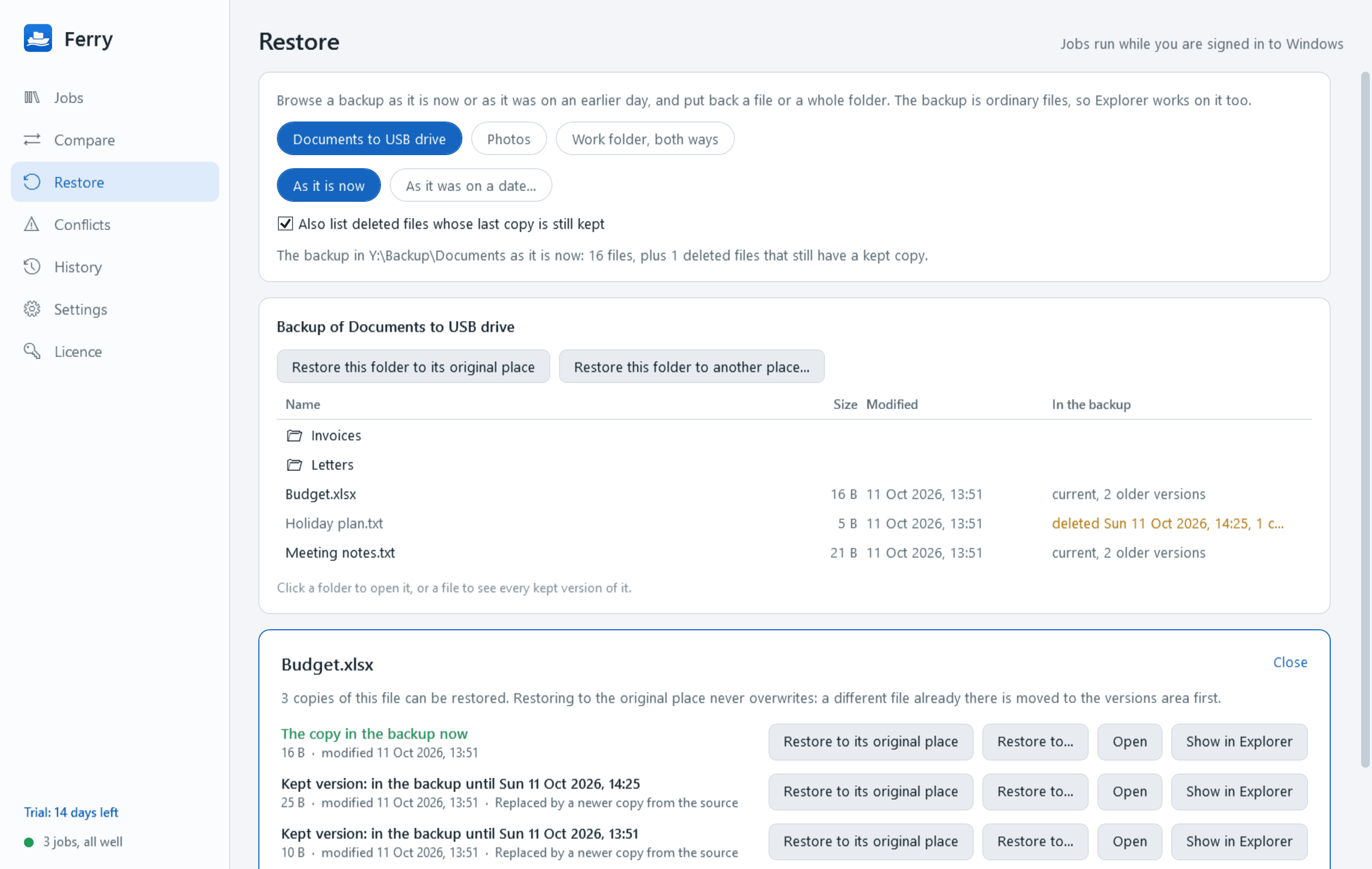
- Restore: browse the backup as it is now or as it was on a chosen date, see every kept version of a file, preview it, and restore a file or a whole folder, to its original place (a different file already there is itself kept as a version, not overwritten) or somewhere else.
When it runs
- By hand; every so many minutes, hourly, daily at a time, or on chosen weekdays; when the drive is connected; as files change, after a short quiet spell so a file being saved is not copied half-written; and a catch-up at sign-in if a scheduled run was missed.
- An external drive is recognised by what it is, not by its letter: the job still works when Windows gives the drive another letter, and never runs against a different drive that happens to get the old one.
Copying properly
- Each file is copied under a temporary name and renamed when complete, so an interrupted copy never leaves a broken file posing as a good one. Optional checksum verification after every copy.
- Modified and created times and attributes are kept. Long paths, awkward names, very large files and network shares are handled. A share's sign-in is left to Windows; Ferry stores no passwords.
- It picks up cleanly after an unplugged drive, sleep, sign-out or a crash.
- Files in use are skipped, listed and tried again. A job can instead copy open files through Windows' shadow copy feature, which needs an administrator's approval in Windows' own prompt each time.
- Filters by folder, name, extension, size and hidden or system; sensible exclusions to start with; online-only cloud files are skipped rather than downloaded unless you choose otherwise.
- A speed limit, pause, and low priority so the PC stays responsive.
Guards that are always on
- A source that is missing, empty or on a drive that is not connected stops the job with an error. It is never treated as "everything was deleted".
- A run that would remove or replace more than a set share of the backup (25% unless you change it) pauses and asks, with the numbers.
- Free space is checked before starting, and a destination that fills up stops the run cleanly.
- A job whose two folders are the same, or one inside the other, or whose destination is a system folder, is refused.
- Deleting a job never deletes the backed-up files.
Keeping an eye on it
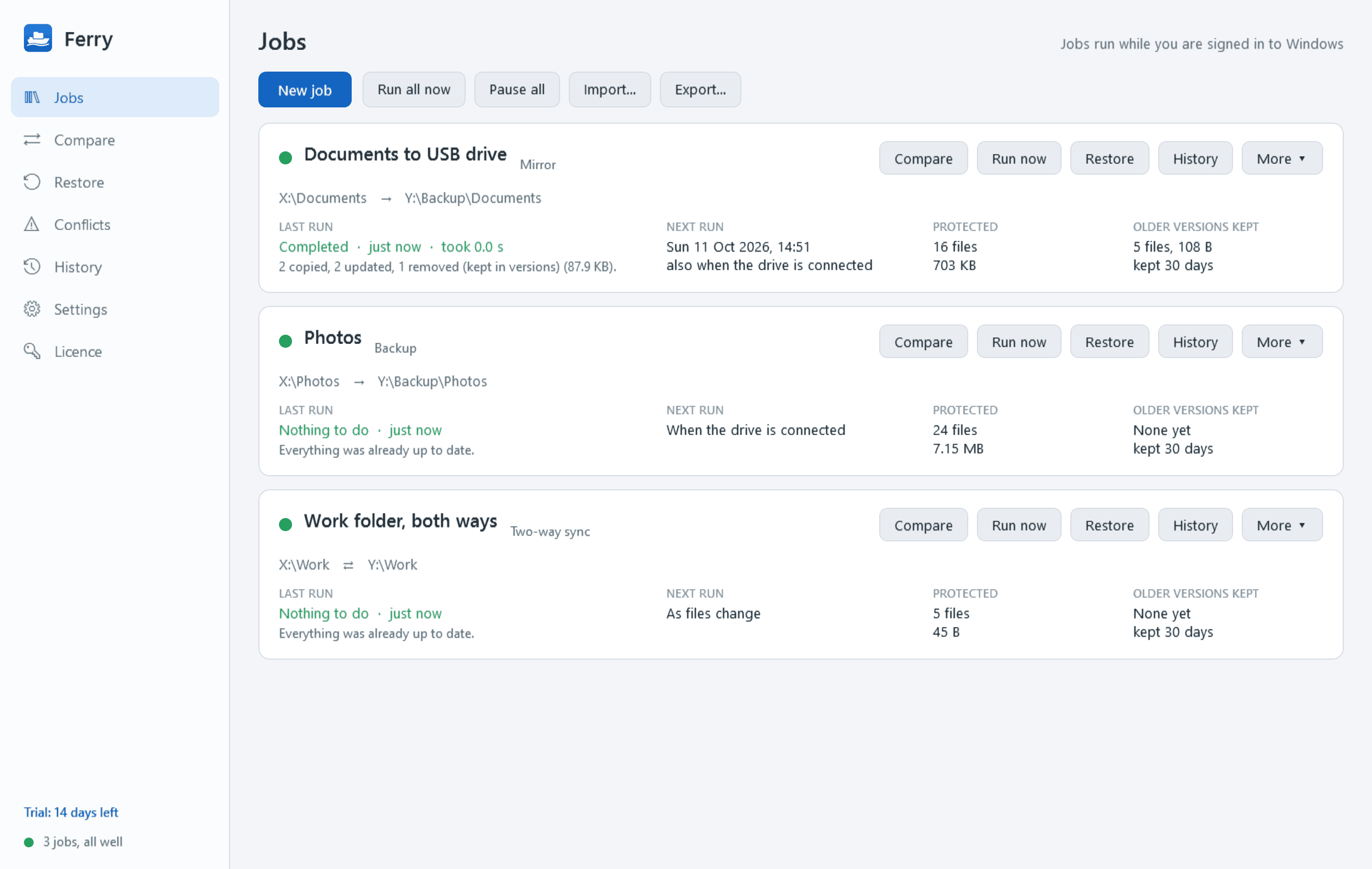
- A dashboard of jobs: last run, result, next run, files and size protected, a status dot; anything failing or overdue at the top.
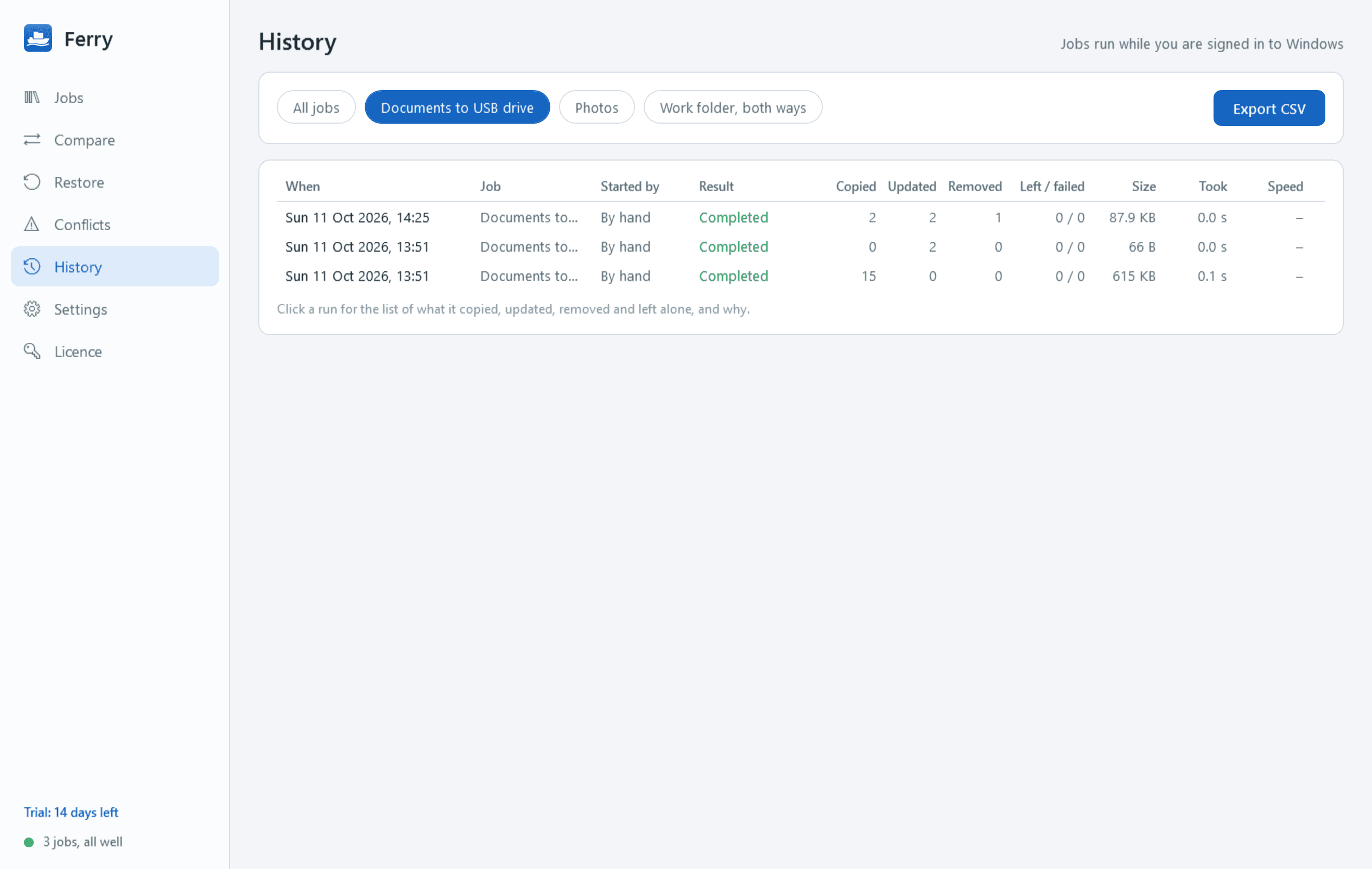
- A history of every run: what was copied, updated, removed, left alone and why, in plain language, with duration and speed.
- Notifications for finished, failed, conflicts to review and "this backup has not run for 7 days", each of which can be switched off; optionally "safe to remove the drive".
- A notification-area icon showing running, idle or attention needed. Light and dark mode. Job definitions can be exported and imported.
Good to know
- Ferry works with folders this PC can reach as ordinary paths. It does not do cloud storage, encryption or PC-to-PC sync.
- It installs for your user account only and never asks for administrator rights for normal use. There is no Windows service: jobs run while you are signed in.
- Nothing leaves your PC. The only thing Ferry contacts, apart from network shares you choose yourself, is this store, to check the licence and look for a new version.
- Free to try for 14 days with every feature. After that Ferry needs a licence: without one no job runs, and nothing is copied, changed or removed. You are never locked out of your own backups: Restore stays fully usable, your backup folders open as always, your job definitions can be exported, and no kept version is cleared out while there is no licence.
One-time purchase for one PC. Includes every version released in the following 12 months; the version you have keeps working after that.
Screens
A closer look.
Need somethinglike this built?
A few lines is enough. You will hear back from a person within one business day.